Introduction
Building on the idea that recipes should be flowcharts, this post explores how to convert traditional text-based recipes into clear, visual flowcharts. Using D3.js, a node network is generated from a recipe. The process steps and ingredients are draggable for flexibility and clarity.
Fill in your recipe in the text box and click Generate Flowchart. Two example recipes are added below to showcase the recipe syntax and a possible final image (lightmode only) after (re)organizing the flowchart. Feel free to copy the recipes in the recipe text box to see what happens.
After generating the initial recipe flowchart. You can drag around the nodes to obtain a logical order and to avoid overlaps of links between nodes. This process requires some artistic input from the user (for now …). The flowchart adapts to light/dark mode, but was designed for light mode first. A button to switch between light and dark is added for convenience.
Quick tips for getting started
The recipe syntax is designed to be close to natural language, with some caveats:
- Keep ingredients and processes separate. All ingredients are added using
Add <ingredient>. This ensures ingredients are visible at a glance in the flowchart and maintains consistency. - If ingredients and amounts overlap, feel free to adjust the width of the ingredient box. Keep in mind that the consistency between your recipes will be lost.
- Don’t forget to add cookware to the processes using
<process> in <cookware>, as doing so benefits the visual flow of the recipe. - Ingredient and process nodes can be further clarified using
(<clarification>), e.g.:Add Salt (quiet) {5 g},Stir (reckless) in Casserole.
Recipe generator
Recipe syntax
Let’s start with some examples based on the recipes from the previous post on the topic. They showcase the current capabilities of the flowchart generator.
An LLM-initiated (Claude Sonnet 4.5) specification is added below the examples to facilitate writing new recipes.
The generated images are not optimized for dark mode as the exporter (currently) only supports light mode exporting for printing purposes.
Examples
Flemish beef stew
---
Title: Flemish Stew
Author: Thomas
Date: 2025
Comment: Based on Jeroen Meus
---

Subprocess Grill {
    Add meat {1 kg}
    Grill (in butter) in Braising pan
    Out meat
    Add Beer {2 bottles}
    Cook in Braising pan
    Out sauce
}

Subprocess Bread {
    Add Bread {1 slice}
    Add Mustard {2 Tb.}
    Smear
    Out .
}

Add Onion {2}
Chop
Sauté (in butter) in Casserole
Add meat from Grill
Add sauce from Grill
Add Laurel
Add Thyme
Add Cloves {1}
Add Sirup {1 Tb.}
Add . from Bread
Simmer (on low heat) in Casserole
Add Vinegar
Serve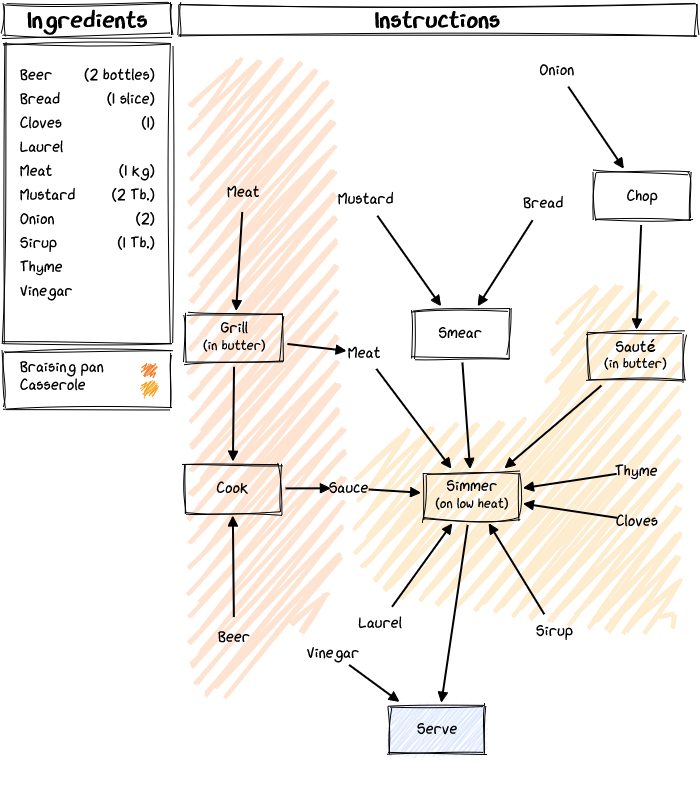
Brussels Wafels
---
Title: Brussels wafels
Author: Thomas
Date: 2025
Comment: Based on Jeroen Meus
---

Subprocess A {
    Add egg {1}
    Separate
    Out White
    Out Yolk
}

Subprocess B {
    Add White from A
    Beat It (1983) in Mixing bowl 2
    Out .
}

Subprocess C {
    Add Butter {50 g}
    Melt
    Out .
}

Add Yolk from A
Add Yeast {6 g}
Add Milk {125 g}
Add Water {125 g}
Mix in Mixing bowl 1
Add Flour {150 g}
Add . from C
Add Salt {a pinch}
Mix in Mixing bowl 1
Add . from B
Mix (Carefully) in Mixing bowl 1
Bake
Serve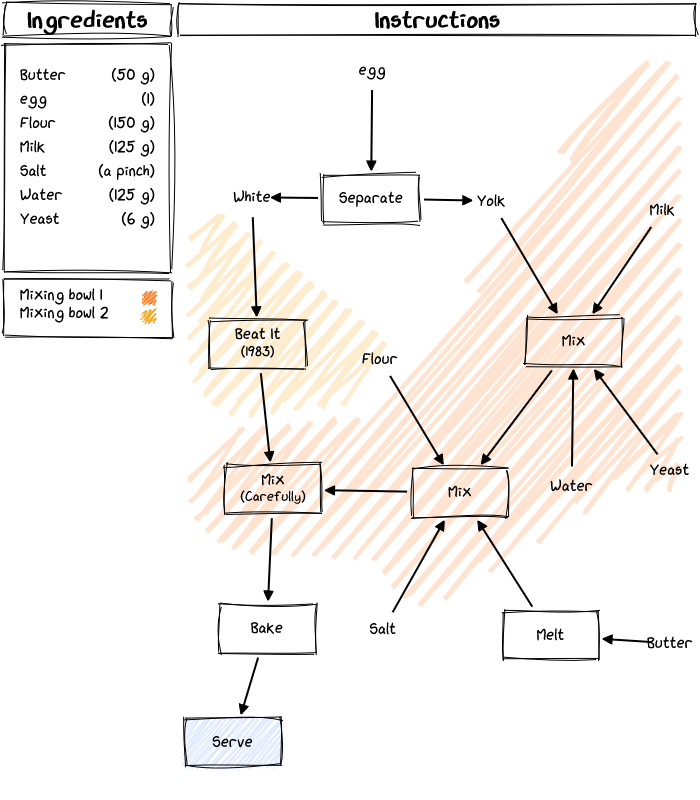
Internationalization
It is possible to change the title blocks to reflect the recipe language by including a settings block to the top of the file. Below is an example for the dutch version of the Brusselse wafels recipe.
---
Title: Brusselse wafels
Author: Thomas
Date: 2025
Comment: Gebaseerd op Jeroen Meus
Ingredients: Ingrediënten
Instructions: Instructies
---

Subprocess A {
    Add Ei {1}
    Scheid
    Out Wit
    Out Geel
}

Subprocess B {
    Add Wit from A
    Klop op in Mengkom 2
    Out .
}

Subprocess C {
    Add Boter {50 g}
    Smelt
    Out .
}

Add Geel from A
Add Gist {6 g}
Add Melk {125 g}
Add Water {125 g}
Meng in Mengkom 1
Add Bloem {150 g}
Add . from C
Add Zout {een snuifje}
Meng in Mengkom 1
Add . from B
Meng (voorzichtig) in Mengkom 1
Bak
Smakelijk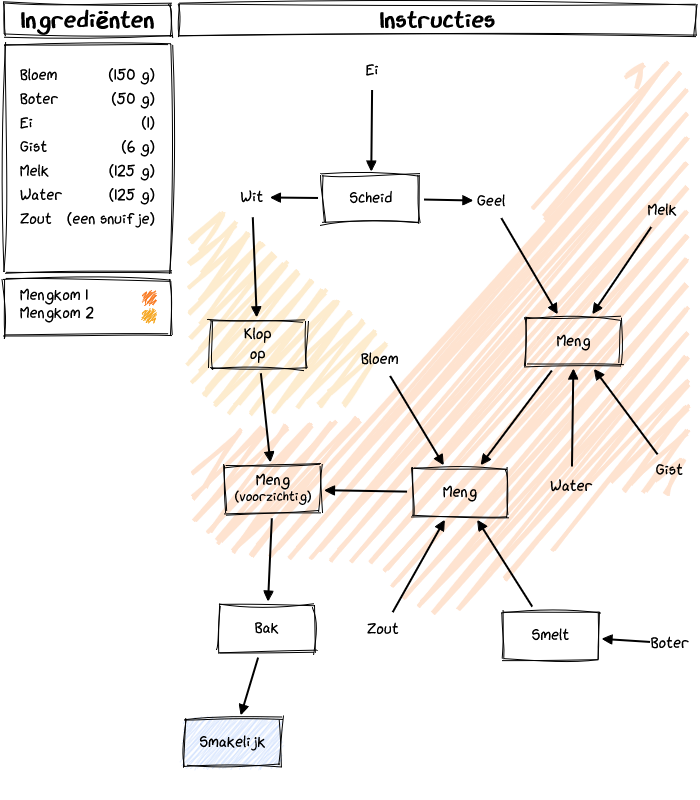
Language Specifiaction
This section was generated by Claude Sonnet 4.5.
Basic Syntax
Ingredients
Add ingredients using the Add keyword:
Add <ingredient name> (<clarification>) {<amount>}- ingredient name: The name of the ingredient (required)
- clarification: Optional details in parentheses (e.g., how to add)
- amount: Optional quantity in curly braces
Examples:
Add Egg {1}
Add Butter {50 g}
Add Salt {a pinch}
Add Milk {125 g}
Process Steps
Any line that doesn’t start with Add, Subprocess, or Out is treated as a process step:
<action> (<clarification>) in <cookware>- action: The cooking action (e.g., Mix, Beat, Melt, Chop)
- clarification: Optional details in parentheses (e.g., time, temperature, technique)
- cookware: Optional cookware specification using
in <name>
Examples:
Mix
Whisk
Beat in Mixing bowl 2
Simmer (on low heat) in Casserole
Grill (in butter) in Braising pan
Output
Mark the final output using the Out keyword:
Out
Out <label>- Without a label, defaults to “Serve”
- With a label, uses the specified text as the output node
- If the
Outkeyword is not specified, the last line is taken as the output
Examples:
Out
Out Serve
Serve
Advanced Features
Subprocesses
Define reusable subprocesses that can run in parallel:
Subprocess <Name> {
    <steps>
    Out <output name>
}- Name: Unique identifier for the subprocess
- output name: Name to reference this output (use
.for default output) - Multiple outputs can be defined with different names
Example:
Subprocess A {
    Add Egg {1}
    Separate
    Out White
    Out Yolk
}
Referencing Subprocess Outputs
Use subprocess outputs in the main recipe or other subprocesses:
Add <output name> from <Subprocess Name>Examples:
Add White from A
Add Yolk from A
Add . from C
The . refers to the last (or only) unnamed output of a subprocess.
Front Matter (Optional)
Add information or customize section titles using YAML-style front matter:
---
Title: <title>
Author: <author>
Date: <date>
Comment: <comment>
Ingredients: <custom title>
Instructions: <custom title>
...
---
Example:
---
Title: Brusselse wafels
Author: Thomas Van Riel
Date: 2025
Comment: Based on Jeroen Meus
Ingredients: Ingrediënten
Instructions: Instructies
---
This is useful for localization or custom branding. The front matter can also be used to include other information (e.g. the date, author)
Comments
Add comments to your recipes using //:
Add Eggs {2}  // Use room temperature eggs
Whisk  // Beat until frothy
// This entire line is a comment
Heat pan- Inline comments: Text after
//on any line is ignored - Full-line comments: Lines starting with
//are completely ignored - Use for: Notes, clarifications, or temporary disabling of recipe steps
Complete Examples
Simple Recipe (No Subprocesses)
Add Eggs {2}
Add Butter
Add Salt
Add Pepper
Crack eggs
Whisk
Heat pan
Melt butter
Pour eggs
Scramble (2 min)
Season
Out
Recipe with Subprocesses
Subprocess A {
    Add Egg {1}
    Separate
    Out White
    Out Yolk
}

Subprocess B {
    Add White from A
    Beat in Mixing bowl 2
    Out .
}

Add Yolk from A
Add Yeast {6 g}
Add Milk {125 g}
Mix in Mixing bowl 1
Add . from B
Mix (Carefully) in Mixing bowl 1
Bake
Out Serve
With Localization
---
Ingredients: Ingrediënten
Instructions: Instructies
---

Subprocess A {
    Add Ei {1}
    Scheid
    Out Wit
    Out Geel
}

Add Geel from A
Add Gist {6 g}
Meng in Mengkom 1
Bak
Smakelijk
Visualization Features
When rendered as a flowchart:
- Ingredients appear as small nodes
- Process steps appear as rectangular nodes
- Cookware (specified with
in <name>) creates colored background regions (10 different colors are defined) - Output appears as a filled node at the bottom
- Arrows show the flow between steps
Tips
- Order matters: Steps are executed in the order they appear
- Parallel processing: Use subprocesses for steps that can happen simultaneously
- Cookware tracking: Include
in <cookware>to visually group related steps - Clarity: Use clarifications
(in parentheses)for timing, temperature, or technique details - Amounts: Always specify amounts in curly braces for ingredient tracking
Parser Behavior
- Blank lines are ignored
- Comments (text after
//) are stripped before parsing - Ingredients added from subprocesses are not duplicated in the ingredient list
- The last process step in the main recipe is treated as the output if no
Outstatement is present - Subprocess outputs marked with
.use the last process node in that subprocess - All ingredients from
Addstatements (not from subprocesses) are alphabetically sorted in the ingredient list
Information for LLMs
This section was generated by Claude Opus 4.6.
If you’re using an LLM (ChatGPT, Claude, Gemini, …) to help convert a recipe, paste the following instructions into your conversation to give the model the context it needs.
# .recipe format specification

Convert the recipe I give you into `.recipe` format. Output ONLY the converted recipe, no explanation.

## Rules

1. Every ingredient is added with `Add <name> {<amount>}`. Never combine an ingredient with a process step.
2. Process steps are any line that does not start with `Add`, `Out`, or `Subprocess`. Append `in <cookware>` to assign a step to cookware (creates a colored region in the flowchart).
3. Add clarifications in parentheses: `Sauté (in butter) in Pan`, `Simmer (20 min, low heat) in Pot`.
4. Use `Subprocess <Name> { ... }` for steps that happen in parallel. End with `Out <label>` (or `Out .` for an unnamed output). Reference outputs later with `Add <label> from <Name>`.
5. The final line should be `Out` (defaults to "Serve") or a process step like `Serve` (auto-detected as output).
6. Optional YAML front matter between `---` fences: Title, Author, Date, Comment, Ingredients, Instructions.
7. Comments: `// text` (inline or full-line).

## Example

```
---
Title: Flemish Stew
Author: Thomas
Date: 2025
Comment: Based on Jeroen Meus
---

Subprocess Grill {
    Add Meat {1 kg}
    Grill (in butter) in Braising pan
    Out Meat
    Add Beer {2 bottles}
    Cook in Braising pan
    Out Sauce
}

Subprocess Bread {
    Add Bread {1 slice}
    Add Mustard {2 Tb.}
    Smear
    Out .
}

Add Onion {2}
Chop
Sauté (in butter) in Casserole
Add Meat from Grill
Add Sauce from Grill
Add Laurel
Add Thyme
Add Cloves {1}
Add Sirup {1 Tb.}
Add . from Bread
Simmer (on low heat) in Casserole
Add Vinegar
Out
```

## Key patterns

- Separate ingredients from actions: `Add Butter {50 g}` then `Melt in Pan` (not `Melt butter in pan`)
- Group parallel prep into subprocesses (e.g., separating eggs, melting butter)
- Use consistent cookware names so the flowchart groups steps correctly
- Keep process labels short (1-3 words + optional clarification)